WYSIWYG

http://kufli.blogspot.com
http://github.com/karthik20522

Tuesday, April 14, 2015

ReIndexing Elasticsearch in Scala

The following scala script reads from one index and writes to another script using Scan and scroll method. The script also takes in a partial function where the values from one index can be manipulated before saving into another index. This script assumes you have a field called "id" and an field called "submitDate" so it can continually perform scan and scroll once the preliminary index copy is done, so keep the index's in sync. Notes:
  • The ESClient is an extension of on wabisabi Library for elasticsearch
  • The Actor initially performs a scan-scroll with submit date gte 1900
  • Once the initial scan-scroll is done, it pauses for a minute and performs a scan-scroll again with the submitDate of previous endTime (dateTime.now minus 1 minute)
  • This way every minute after the previous run it will continually keep the index in sync
  • The partial function "processData" provides a way to manipulate the original data, manipulate it and save it to the new index
  • Bulk-indexing is used for saving to the new index, hence a the "id" field is required to determine the "id" of the new document
Usage:

Labels: , ,

Tuesday, March 31, 2015

Calling SOAP Service in Scala

Scala out of the box has limited capability to call SOAP service neither does libraries such as http-dispatch or spray client. SOAP service is reality is just a xml request/response service and lo and behold, XML is a first class citizen in Scala.

One of the widely used library is ScalaXB which helps in generating case classes given a xsd or wsdl file. Scalaxb is an XML data-binding tool for Scala that supports W3C XML Schema (xsd) and Web Services Description Language (wsdl) as the input file. This is great but it's quite hard to maintain and the code readability goes down the drain as the code is dynamically generated. For example, the following screen shot is what scalaxb generates when either a wsdl or xsd is provided


But what we really need is a trivial way to call a webservice using our existing http clients. Following is one way of doing so.
In this below example, i am calling a service that returns back a list of keywords given a list of keywordid's.
In the above script, all that i am doing is constructing the soap request headers manually and performing a POST operation. There are couple of things to be noted:
  • "SOAPAction" header is manually added to let the service know which service operation it is intended for
  • Setting the charset to UTF-8 and removing unicode characters "[^\\x20-\\x7e]"
  • Removing the unicode characters are necessary as scala fails to parse the response. This mostly seems to happens when calling .NET WCF services

GetKeywordDetailsRequest is a class that has the input parameters and has a function that generates the formatted xml for the soap request

Labels: , ,

Sunday, January 4, 2015

Scala Parser Combinators - SQL Parser Example

Scala Parser Combinators: https://github.com/scala/scala-parser-combinators

Scala Parser Combinators is basically a parsing framework for extracting data when there is a pattern in the given input. This framework provides a more statically typed, functional way of extracting instead of using regex expression which can get hard to read.

In this post, lets build a SQL parser where given a valid sql statement we can identify the "table" name, "column" names and other sql properties. Following are some fundamental functions, operations that Scala combinator provides which would help in parsing:
  • " | ": says “succeed if either the left or right operand parse successfully”
  • " ~ ": says “succeed if the left operand parses successfully, and then the right parses successfully on the remaining input”
  • " ~> ": says “succeed if the left operand parses successfully followed by the right, but do not include the left content in the result”
  • " <~ ": is the reverse, “succeed if the left operand is parsed successfully followed by the right, but do not include the right content in the result”
  • " ^^ ": says “if the left operand parses successfully, transform the result using the function on the right”
  • " ^^^ ": says “if the left operand parses successfully, ignore the result and use the value from the right”
  • " rep(fn) ": says "parse the given input using the parser function fn"
  • " repsep(ident, char) ": says "parse the given input and split the input using the given 'char'"
Lets start out with a set of SQL statements and it's associated Parser code

select * from users

select name,age from users

select count(name) from users

select * from users order by age desc

select * from users order by name, age desc

select age from users where age>30

Labels:

Friday, September 6, 2013

Spray.io REST service - Http Error Codes - Lesson 8

View the lessons list at https://github.com/karthik20522/SprayLearning

In the previous post in this series about Spray.io REST API, I talked about simple error handling and rejections. What about errors in the context of RESTful API best practices? From the perspective of the developer consuming your Web API, everything is a black box. When developing their applications, developers depend on well-designed errors when they are troubleshooting and resolving issues when using your API.

There are over 70 HTTP status codes but offcourse we don't need to use all of them. Check out this good Wikipedia entry for all HTTP Status codes. So in Spray, we basically can implement all the status codes in the complete magnet depending on if its an Exception or Rejection.
Checkout out these error/httpStatus code from various RestAPIs:

Labels: ,

Monday, August 19, 2013

Spray.io REST service - Exception, Rejection and Timeout Handling - Lesson 7

View the lessons list at https://github.com/karthik20522/SprayLearning

Handling exceptions with the application and returning a valid http response with message is probably the way to go for building readable REST Api's. In spray,exceptions thrown during route execution bubble up thru the route structure up to the next enclosing handleExceptions directive. If you’d like to customize the way certain exceptions are handled simply bring a custom ExceptionHandler into implicit scope of the runRoute wrapper. For example:

More information on Handling Exceptions can be found at spray-routing/key-concepts/exception-handling/

How about handling Rejections? Similar to handling exceptions we can handle rejections in similar fashion. In this example I have created a separate trait with the rejection handler. I came across an issue with some conflict with shapeless syntax and rejection handler syntax "::"
More information on Handling Rejections at spray-routing/key-concepts/rejections/

Timeout Handling: spray-routing itself does not perform any timeout checking, it relies on the underlying spray-can to watch for request timeouts. The timeout value is defined in the config file (application.conf) More information on Timeout Handler at spray-routing/key-concepts/timeout-handling/

Labels: ,

Sunday, August 18, 2013

Spray.io REST service - API Versioning - Lesson 6

View the lessons list at https://github.com/karthik20522/SprayLearning

Before we get into spray, would recommend reading different ways of Versioning an API or best practices of versioning an API at best-practices-for-api-versioning or versioning-rest-api.

To summarize the stackoverflow discussion, there are 3 ways to do versioning.
  • Header based - using X-API-Version
  • URL based - http://{uri}/v1/getCustomer
  • Content negotiation via Accept headers - application/vnd.example.v1+json (mediatype)
For this tutorial, I would be implementing the first two.

1) Header based - using X-API-Version Here I am building a Directive that extracts the version from the request header. If not exists than I am defaulting to 1 In the above code there are two keywords, "extract" and "provide". These are part of Sprays BasicDirective. "extract" basically allows you to extract a single value and "provides" allows you to inject a value into the Directive. But wait, we can make this trait even smaller by getting rid of the provide all together to something as follows: Note: there are more than one way to write same operation in scala/spray. bane of my existence!
More info at: spray/routing/directives/BasicDirectives.scala

Now that we have defined the directive, we just need to inherit the directive to service trait and call versioning to extract the version number from X-API-Version header field. 2) url based - http://{uri}/v1/getCustomer
Here we are basically performing regex on the incoming request.uri and extracting the version out of "v*". Spray provides quite a few PathFilters and one of them being PathMatcher. More info at:

Labels: ,

Saturday, August 17, 2013

Spray.io REST service - Authentication - Lesson 5

View the lessons list at https://github.com/karthik20522/SprayLearning

"Directives" are small building blocks of which you can construct arbitrarily complex route structures. A directive does one or more of the following:
  • Transform the incoming RequestContext before passing it on to its inner route
  • Filter the RequestContext according to some logic, i.e. only pass on certain requests and reject all others
  • Apply some logic to the incoming RequestContext and create objects that are made available to inner routes as "extractions"
  • Complete the request
More detailed information on directives can be found at http://spray.io/documentation/1.2-M8/ or here Spray-routing/predefined-directives-alphabetically/. In future examples, I would be using Directives so basic understanding would be useful. For this example I would be using Authentication directive to validate the request with a username and password as part of the header.

So, for authentication a new UserAuthentication trait is created which has a function that returns a ContextAuthenticator. The authenticate directive expects either a ContextAuthenticator or a Future[Authenication[T]]. At the crust of ContextAuthenticator is basically Future[Authenication[T]].

Below code that describes the authentication directive basically takes in a ContextAuthenticator and returns a Future of Authentication type of Either Rejection or an Object of type T. What this means is that Either a Rejection is returned (Left) like FailedAuthenticationRejection when credentials are missing or failed; or when successful an object is returned (Right)

The UserAuthentication trait has two functions, one that returns a ContextAuthentication and other that returns a Future. In this example, I am reading the username and password from the application.conf file and validating against it.
Note that I am importing "scala.concurrent.ExecutionContext.Implicits.global", this is because futures require an ExecutionContext and I letting spray to use the default actor ExecutingContext. //implicit val system = ActorSystem("on-spray-can")

Now that we have the authentication setup, we need to inherit the UserAuthenticationTrait using "with" and use the "authentication" directive by passing the "authenticateUser" function that we defined.


Further readings on this topic:
Spray/routing/authentication/HttpAuthenticator.scala
Spray/routing/SecurityDirectivesSpec.scala
https://groups.google.com/forum/#!topic/spray-user/5DBEZUXbjtw
Spray/routing/RejectionHandler.scala

Labels: , ,

Friday, August 16, 2013

Spray.io REST service - MongoDB - Lesson 4

View the lessons list at https://github.com/karthik20522/SprayLearning

Now that we have Spray Service Setup and Routes defined, we can now hookup the database to add and fetch customer information. For the database I am using MongoDB and Casbah. Casbah is a Scala toolkit for MongoDB. Casbah is a "toolkit" rather than "driver", as Casbah is a layer on top of the official mongo-java-driver for better integration with Scala.

To get Casbah setup, we need to add casbah and it's related dependencies to the Build.scala file.
Note that we have slf4j and scala logging in the dependencies. Without slf4j you would get "Failed to load class org.slf4j.impl.StaticLoggerBinder" error.

In my example, I have created a MongoFactory that has 3 functions: getConnection, getCollection and closeConnection.
Now that we have our Factory method, the next is building the data access class for inserting and fetching data. Following code snippet has 2 operations:
  • saveCustomer - which returns back the GUID after inserting into MongoDB
  • findCustomer - find customer by GUID
Now to integrate this to the service: More information and resources on Casbah:

Labels: , ,

Thursday, August 15, 2013

Spray.io REST service - Json Serialization, De-serialization - Lesson 3

View the lessons list at https://github.com/karthik20522/SprayLearning

For a REST based interface, JSON request and response is the norm. There are two ways to set the response format in Spray.

1) using respondWithMediaType In this method, each route/action would have to be explicitly set with media type of json. More info at https://github.com/spray/spray/wiki/Misc-Directives

2) Globally overriding the default format.

For all Json related operations, I am using Json4s as the json library. In the build.scala add the following json4s dependency. Note: you would need to reload the project in sbt and regenerate Eclipse. Eclipse does not refresh itself when new dependencies are added

In the CustomerServiceActor we will need to set the default Format to json4sFormats by adding the implicit formatter For example purpose, lets update the getCutomer action to return a mocked customer. The expected response should be a json formatted customer object.
To post a customer object and deserialize it to customer type, we can use spray entity [http://spray.io/documentation/1.1-M8/spray-httpx/unmarshalling/] and cast the post value to a JObject Further reading on json4s at https://github.com/json4s/json4s

Labels: ,

Spray.io REST service - Controller, Actions, Multiple controllers - Lesson 2

View the lessons list at https://github.com/karthik20522/SprayLearning

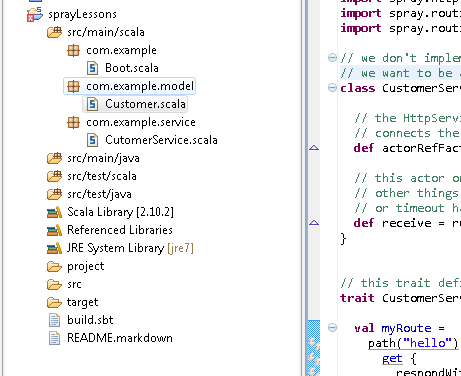
Once you have the Spray.io project setup (http://kufli.blogspot.com/2013/08/sprayio-rest-web-api-basic-setup.html) you can find the boot file and controller files in the "src/main/scala/com/example" folder path. There are two files that are of interest. One is the Boot.scala and other MyService.scala. Boot.scala is basically the placeholder to define the controller (single, multi controllers) and the http binding. Actions of these controllers are coded in the MyService.scala file.

In the following example, I am renaming the MyService.scala to a more meaningful service to CustomerService.scala. Before we start working on the project would like to generate the eclipse project files for the code to be edited on Eclipse rather than Sublime or any text editor.

To get it setup on eclipse, you can run the “eclipse” command within the sbt console. Note that, in plugins.sbt you should have sbteclipse plugin. View the initial project setup http://kufli.blogspot.com/2013/08/sprayio-rest-web-api-basic-setup.html

Following screenshot is the structure of the project within eclipse.


CustomerService.scala class:

This class basically is the controller class with Actions/routes defined in them. I personally like to separate the service behavior from service actor as we want to be able to test it independently without having to spin up an actor.
customerRoutes is the place holder where all the routes/actions are defined and implemented. An example of how routes look is as follows: The urls for accessing the above routes are as :

How about multiple controllers? It is as easy as creating a new trait extending HttpService and piping into the existing route. For example, if we want to create an Ajax service for all search related operations, following is a code snippet: The above project can be downloaded at https://github.com/karthik20522/SprayLearning

Labels: ,

Spray.io REST Web API - Basic setup

What is Spray: "spray is an open-source toolkit for building REST/HTTP-based integration layers on top of Scala and Akka. Being asynchronous, actor-based, fast, lightweight, modular and testable it's a great way to connect your Scala applications to the world". Basically spray is web framework for building REST based services similar to ASP.NET WebAPI. Spray can be used for hosting both a rest based service as well as web pages (static/dynamic)

To get spray up and running you can download the SprayTemplate project from Github.com/spray
Note: there are multiple branches of spray with different spray, akka and server versions. For this example I am using on_spray-can_1.2 branch which has spray-can (server). Scala 2.10, Akka 2.2 and Spray 1.2

Folder Setup:


There are two important files that one must be aware of.

1) build.sbt : this file contains basic information of your project like com name, version and scalaversion. But addition to that there is libraryDependencies which has a list of external/internal libraries that the project might use. For example, if we decide to use json4s library or a mongoDB library, this is the place we would be adding to.
If you notice in the libraryDependecies we have {"io.spray"%"spray-can"% "1.2-M8"}, this can be read as {“GroupId” %”DependencyName”%”Version”}. But what about double “%%”, this is basically letting sbt know to use the version that is compatible with the current version of scala that is being used.

These plugins can be located at maven repository at mvnrepository.com. An example dependency: http://mvnrepository.com/artifact/org.json4s/json4s-native_2.10/3.2.5

2) plugins.sbt: this file contains the plugins that sbt intends to use. Note that plugins.sbt requires an extra line break between the plugins. An example plugins.sbt looks like the following:


To run the project, in the project folder run the following commands:

The above project can be downloaded at https://github.com/karthik20522/SprayLearning

Labels: ,